How to Protect Elderly Parents from WhatsApp Scams in India (2026 Guide)
Your father gets a WhatsApp message. It says his Aadhaar card is linked to a drug trafficking case. There's a video call from someone in a police uniform. They tell him he cannot leave his room — he is "digitally arrested." Don't panic, they say. Just transfer ₹80,000 to clear the case quietly.
He panics. He transfers.
This scenario plays out thousands of times a month across India. The Ministry of Home Affairs reported that cybercrime losses crossed ₹11,333 crore in 2023 (source: MHA Annual Report), with phone and WhatsApp-based fraud accounting for the majority of cases. Seniors are disproportionately targeted — not because they're unintelligent, but because of how they were raised to trust authority and act quickly on "serious" situations.
This guide covers the 8 most common WhatsApp scams targeting Indian seniors right now, explains exactly how each one works, and gives you a practical plan to protect your parents — whether you live next door or in a different country.
Why Our Parents Are Easier Targets
Before getting into individual scams, it helps to understand the psychology.
Your parents grew up in an era where official communication was always serious, institutions were trusted by default, and ignoring a government letter had real consequences. That mental model hasn't updated for 2026. When a "CBI officer" calls on video, the instinct is to cooperate — not to verify.
Add to that: many seniors use WhatsApp as their primary window to the digital world. They're in family groups, religious groups, housing society groups. They share extensively because that's how they stay connected. This makes them both a target (they receive a lot of forwarded content) and an inadvertent spreader of misinformation.
Finally, loneliness and the desire to be helpful make seniors vulnerable to relationship-based scams. If someone has been chatting warmly with them for two weeks before asking for a favour, the emotional cost of saying no feels high.
None of this is stupidity. It's social engineering targeting real human traits.
Where FamAI Comes In
You can't sit next to your parents every time a message arrives — but you can give them a second pair of eyes. FamAI works right inside WhatsApp: your parent forwards any message, link, or screenshot that looks off, and FamAI reads it, checks the links against known scam databases, and replies in seconds — in Hindi — telling them whether it's safe or a likely scam. There's no app to install, no login, nothing new for them to learn. It's the "let me just check first" habit, built into the chat they already use every day.
The 8 Most Common WhatsApp Scams in 2026
1. Digital Arrest
How it works: A caller poses as a CBI officer, ED official, or Telecom Department employee. They claim your parent's number or Aadhaar is linked to illegal activity — drug trafficking, money laundering, or a bogus bank account. They demand your parent stay on a video call (so they can "monitor" them) and not contact anyone. Isolation is the key step — it prevents verification. Then comes the demand for money to "settle" the case without arrest.
Red flags: Any official asking you to stay on video call. Urgency ("you'll be arrested in 2 hours"). Demand for secrecy. Money transfer to "freeze" a case.
The fact that ends this: Digital arrest is not a real legal concept in India. No law enforcement agency conducts investigations over WhatsApp video calls. PM Modi specifically called this out in his Mann Ki Baat address in October 2024.
2. AI Voice Cloning — "Your Child Is in Trouble"
How it works: Scammers harvest voice samples from your Instagram reels or WhatsApp status, then use AI to clone your voice. They call your parents pretending to be you — "Mummy, main ek problem mein hoon, please ₹50,000 bhej do, kisi ko bata mat." Parents hear their child's voice. They transfer.
Red flags: Sudden call from an unknown number. Urgency. "Don't tell anyone." Asks for money before you can verify.
Defence: Establish a family code word — something silly that your parents can ask for in any emergency call. "Bol do tumhara safe word kya hai." A scammer won't know it. We cover this in detail in our AI voice cloning scam guide.
3. Fake Bank Manager / KYC Expiry
How it works: A message or call claims your parent's bank account will be blocked because KYC is incomplete. They need to share OTP, account number, card details, or click a link "to update." The link leads to a fake bank login page. OTP is used to authorize a transfer in real time.
Red flags: Any message asking for OTP. "Your account will be frozen in 24 hours." Link to a page that looks like your bank but the URL is slightly off.
The rule: Banks never ask for OTP, PIN, or CVV over phone or message. Ever. If there's a genuine KYC issue, the bank will send a letter and ask you to visit the branch.
4. Electricity Bill Cutoff Scam
How it works: A WhatsApp message warns that electricity will be disconnected tonight due to an unpaid bill. Call a number immediately. Victim calls, gets connected to a "BESCOM/BSES/MSEDCL officer" who asks them to download a remote access app (AnyDesk, TeamViewer) "to verify the account." Once the app is running, the scammer drains the bank account directly.
Red flags: Electricity companies never contact via WhatsApp. Never download a remote access app for bill issues. Bills are resolved through official portals or local offices.
5. Fake Lottery / Government Prize
How it works: "Congratulations! Your number has won ₹25 lakh in the government's Digital India Lucky Draw. To claim, pay ₹4,500 processing fee." The processing fee is paid. Then there's a tax clearance fee. Then a "RBI release fee." The prize never exists.
Red flags: Any prize that requires fees to claim. Lotteries you didn't enter. "Government" draws — no such schemes exist.
6. Fake Delivery OTP Scam
How it works: A caller claims to be from Amazon/Flipkart with a package that requires OTP confirmation. The OTP is actually a UPI PIN reset or a one-time login to your parent's banking app. Reading it out loud hands account access to the scammer.
Red flags: Delivery OTPs don't authorize payments. If someone is asking for an OTP to "confirm delivery," it's a scam.
7. Investment Group Scam
How it works: Your parent gets added to a WhatsApp group called something like "HDFC Wealth Management VIP" or "NSE Trading Experts." Fake members post screenshots of huge gains. A "financial advisor" invites your parent to invest on a proprietary platform. Early small withdrawals are allowed to build trust. Then a big investment request. Then the group disappears.
Red flags: Being added to unknown groups. Guaranteed returns. A separate trading app you've never heard of. Pressure to invest more to "unlock" earlier deposits.
8. Fake Relative in Trouble
How it works: A message from an unknown number: "Auntyji, yeh mera naya number hai — purana phone kho gaya. Please save this." Then gradually, over days, the person builds rapport. Then a medical emergency. "Bahu hospital mein hai, please 20,000 bhej do, main kal wapas kar dunga."
Red flags: Unknown number claiming to be a known person. Urgency built up over time. Request comes before identity is verified via a real call to the known contact.
How to Set Up WhatsApp Security for Your Parents
These are one-time steps that take about 10 minutes. Do them on your next visit or walk your parent through them on a video call.
Enable Two-Factor Authentication
WhatsApp → Settings → Account → Two-step verification → Enable. Set a 6-digit PIN. Add an email as backup. This prevents account hijacking even if someone gets your parent's SIM.
Disable Auto-Download of Media
WhatsApp → Settings → Storage and Data → Media Auto-Download. Set all three options (Mobile data, Wi-Fi, Roaming) to "No media." This prevents malicious files from running automatically and keeps the phone storage clean.
Set Privacy to Contacts Only
WhatsApp → Settings → Privacy. Set "Last seen," "Profile photo," "About," and "Status" to "My Contacts." This limits how much personal information strangers can harvest.
Turn Off "Calls from Unknown Numbers"
WhatsApp → Settings → Privacy → Calls → Silence unknown callers. Scam calls often come from numbers your parent doesn't know. This routes them to a missed call list rather than ringing through.
Leave Unknown Groups Immediately
If your parent is added to an unknown group (investment, prize, government), leave immediately. WhatsApp Settings → Privacy → Groups → "My Contacts" prevents strangers from adding them to groups without permission.
Tools That Help
The hardest part of scam protection isn't knowledge — it's the moment of decision when a parent receives a suspicious message and has 30 seconds to decide what to do. Calling you might feel like a bother ("Woh toh busy rehta hai London mein"). Doing nothing feels risky. Acting immediately is what the scammer wants.
This is the gap that FamAI is designed to fill — a trusted second opinion available at 2 AM when you're asleep and your parent is staring at a suspicious message. They already know how to forward a message on WhatsApp. That's all it takes.
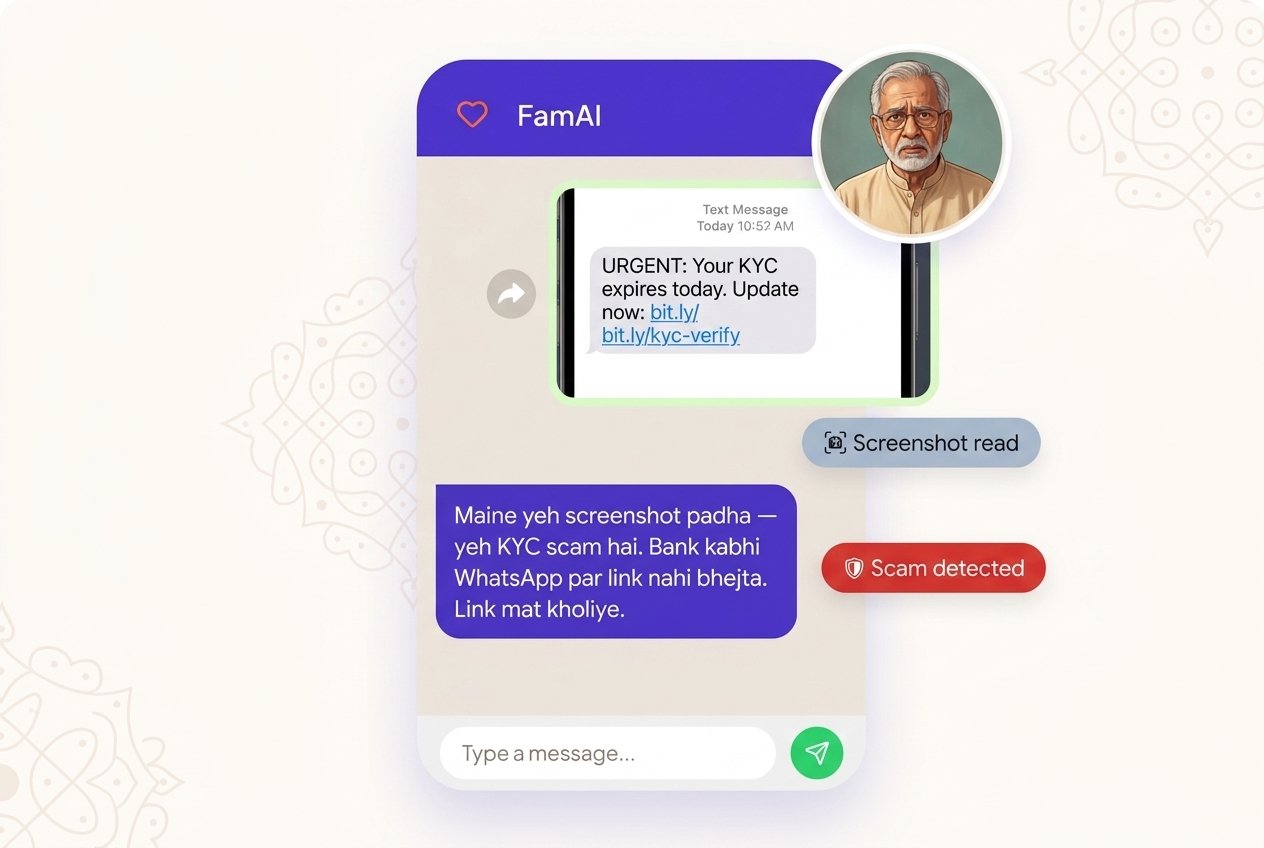
Here's exactly what happens the moment they forward something suspicious:
- It reads the message — even a screenshot. FamAI pulls out the exact text and any links, so a blurry forward or a photo of an SMS still gets checked.
- It checks every link. URLs are matched against Google's Safe Browsing database and scanned for classic tricks — lookalike domains, typo-squatted spellings, hidden shorteners, raw IP addresses.
- It explains the verdict in Hindi or English. Not just "scam" or "safe" — what kind of scam it is, why, and what to do next, in the language your parent actually reads.
- It answers in seconds, any hour. No waiting for you to wake up, no feeling like a bother. No app to install, no login — just a forwarded message.
What to Do If Your Parent Has Already Been Scammed
Act within the first hour. Speed matters — banks can reverse recent transfers to flagged accounts if you act fast enough.
- Call 1930 immediately — this is India's National Cybercrime Helpline. It operates 24/7 and can initiate a freeze on fraudulent bank transfers.
- File a complaint at cybercrime.gov.in — document everything: phone numbers, screenshots, transaction IDs, timestamps.
- Contact the bank directly — call the bank's fraud helpline (not the number in the scam message) and report the unauthorized transaction. Request a hold on the destination account.
- Change WhatsApp PIN and email password — especially if your parent shared any OTPs or clicked any links.
- Don't shame them — many seniors don't report scams because they're embarrassed. Reassure them: these scams fool even educated, careful people. The shame belongs to the scammers.
Important: Do not post about the scam publicly on social media before filing a complaint. Scammers sometimes monitor and approach victims again, posing as "recovery agents" who claim they can get the money back — for a fee. That's a second scam.
The Family Plan: Five Habits That Actually Work
Security tools matter, but habits matter more. Here are five family-level habits worth installing:
- A family code word. Pick something silly — "mango pickle" or "blue elephant." Any call claiming to be a family member in trouble must use this word. Scammers won't know it.
- The 30-minute rule. No money transfer for any reason until you've waited 30 minutes and verified via a call to the known person's real number.
- "Forward before you fear." Any suspicious message gets forwarded to you or to FamAI before any action is taken.
- No OTPs, ever. No legitimate entity — bank, government, delivery company — will ever ask for an OTP over phone or chat.
- Government doesn't use WhatsApp. Official orders arrive by post or registered mail. A video call from a "CBI officer" is always fake.
Frequently Asked Questions
What is the most common WhatsApp scam targeting Indian seniors?
The "digital arrest" scam is currently the most damaging. Scammers impersonate CBI or police officers via video call and claim your parent is under investigation, demanding money to "settle" the case quietly. Digital arrest is not a real legal concept in India.
How do I set up WhatsApp two-factor authentication for my parent?
Open WhatsApp → Settings → Account → Two-step verification → Enable. Set a 6-digit PIN your parent can remember. Add an email for recovery. This prevents account hijacking even if someone gets the SIM card.
What should I do if my parent has already been scammed?
Call 1930 (National Cybercrime Helpline) immediately. File at cybercrime.gov.in. Contact the bank within 30 minutes — they can sometimes freeze the destination account. Don't shame your parent; comfort and action matter more.
Are educated seniors also at risk?
Absolutely. These scams exploit fear and urgency — psychological triggers that bypass rational thinking regardless of education level. Retired bank managers, doctors, and professors have all been victims. Awareness and slow-down habits are the real defences.
Should I disable auto-download on my parent's WhatsApp?
Yes. Go to WhatsApp → Settings → Storage and Data → Media Auto-Download. Set all three options to "No media." This prevents malicious files from downloading automatically and saves phone storage.